|
Additional options when editing |
Scroll |
Deleting source objects
This is available for all commands except Click copy and Copy by circle.
You can delete the source object (the objects on which the operation is being performed) or leave them in the document. For this you use the Delete Source Objects option of the Parameter Panel. If the option is enabled, the source objects are deleted when the operation is completes, and if it is disabled, they remain in the document.
Copying attributes and properties of objects
This is available for all commands except Transform into spline.
You can control copying of attributes and properties of source objects. For this you use the controls located in the Attributes and Properties section of the Parameter Panel.
For the attributes of transformed objects to be the same as of original ones, enable the Copy Attributes option. More information about copying attributes...
For the properties of transformed objects to be the same as of original ones, enable the Copy Attributes option. Management of copying applies to properties of macro-elements, view and fragment inserts, whose names are set by the user. More about property copying...
|
Options to copy properties/attributes are not available in the following cases: •if no one of the source objects has properties/attributes set by the user •for shift and rotation commands, also if the Delete Source Objects option is enabled. |

Remembering parameters
This is available for Shift, Rotation and Symmetrycommands.
If you need to perform several operations of the same type in sequence, and their parameters partially coincide, use the Remember Status button. This option is used for operation conducted on the same object (for example, obtaining multiple symmetric copies of the source object). At the same time the original object should remain after performing the operation, i. e. the Delete Source Objects option should be disabled. The parameters are kept until the command is completed. More information about remembering parameters...
Example. Performing multiple shifts of an object along the Y axis with retaining the source object.
1.Run the Offset command and select the desired object.
2.If the Delete Source Objects option is enabled, disable it.
3.In the X–axis shift field, enter the X axis offset value.
4.Click Remember Status.
5.Set the offset value in sequence in the Y–axis shift field.
This is available for the Scaling and commands to copy objects, except the Copy by circle command.
The length of extension lines and dimension leader lines (if dimensions are among objects involved in the operation) can be changed according to the given scaling coefficient. To do this, enable the Scale Extension Lines option in the Parameter Panel.
It is recommended to enable scaling of extension lines when significantly changing the scale of objects among which there are many dimensions.
|
|
|
a) |
b) |
c) |
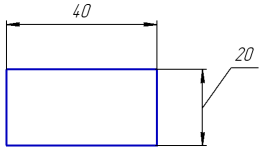
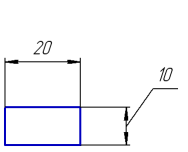
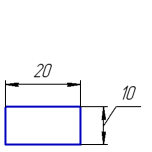
Scaling object copies in half
a) the original object, b) copying without scaling of extension lines,
c) copying with scaling of extension lines
