|
Overview |
Scroll |
The Model Tree is displayed by default when working with any part or assembly. Use the Document Tree toolbar. The display of this panel on the screen is controlled by the Setup — Panels — Document Tree command.
A model tree consists of several structured lists:
•Design Tree, which can have the form of:
•Design History – display of the Design Tree as a list of objects in the order of their creation (see section ) Displaying Model Design History in the Tree),
•Model Structure — display of the Build Tree with grouping of objects by types (see section Structural Representation of the Design Tree),
•Version and Variant Tree,
•Zone Tree,
•Layer tree.
The display of these lists in the Tree Panel is controlled by the buttons on the toolbar below the Panel header. To enable display of a particular list, press the corresponding button:
 Design History — for the Construction Tree in the form of a construction sequence,
 Structural representation is for the Assembly Build Tree in the form of a model structure,
 Versions — for the Execution Tree and variants,
 Zones — for Zone Tree,
 Layers – for the Layer Tree.
When you enable display of the list, additional controls appear in the Panel. For example, a separate area appears at the bottom of the Panel to display the relations between objects, object parameters, or their variables for the Design Tree. Buttons at the top of the area determine its content:
 Relationships — shows relations, in which the selected object participates,
 Parameters — shows Parameter Panel with the properties of the selected object,
 Variables — shows list of variables with variables of the selected object.
If the Tree is displayed as a model structure, the right part of the Toolbar Panel contains the  Tree Composition button, which manages the set of sections displayed in the Tree. More information about Configuring Tree structure...
For the Version Tree, Zone Tree, and Layer Tree, the Tool area includes buttons that control the Tree objects, such as versions, zones, and layers, respectively.
The figure shows an example of how the assembly Design Tree is displayed as a model structure.
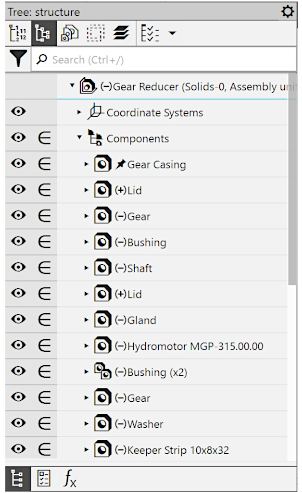
Build Assembly Model Tree
This section and its subsections describe the model Design Tree. The remaining Trees are described respectively in sections Version and Variant Tree, Zone tree and Layer tree.
