|
Blank Item |
Scroll |
A blank BOM item is a special BOM item to reflect information about the blank. The blank item is associated with the source item, i. e. the item for which it is a template, and is always positioned after it.
To create a blank item, use the Add a blank object command available in the context menu of an already existing base item (in any section except the Documentation section).
After running the command, a new BOM item is created and positioned below the item for which the command was run. The system switches to the edit mode for the created item. Enter the text part. Please note that you cannot enter a reference number for a blank item — a dash (minus) is automatically inserted into the Ref. No. cell and cannot be deleted. By default, the quantity for the blank item corresponds to the quantity for the source item; the value can be edited.
If required, fill in the additional columns of the blank item and attach documents to it.
A line with the text “(Blank for ...XXXXXX...)” is added to the name of the blank item, where ...XXXXXX... is the designation of the source item for the blank item. You cannot edit this text. If the designation of the source item includes more than 10 characters, it is transferred to a new line. The change of the designation of the source item is automatically transferred to the name of the blank item.
|
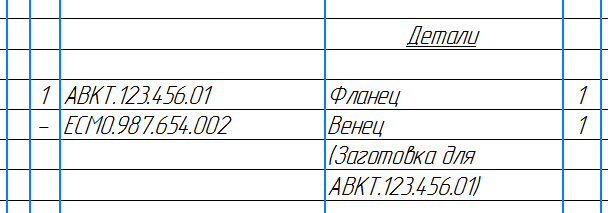
Blank Item in BOM
Notes on working with a blank item:
•A blank item cannot be moved in the BOM table separately from the source item.
•When copying the source item, the blank item is not copied; you cannot copy the blank item.
•Versions of the source item are created without blank items. If necessary, you can add blank items to versions in the usual manner.
•When deleting the source item, the blank item is deleted automatically; it is possible to delete the blank item separately from the source item.
•Source items are hidden together with their blank items. Blank items are displayed in the hidden items viewing mode, but new blank items cannot be created in this mode.
•In a group BOM, an item with a blank item will be classified as constant data if identical quantities for all versions are specified not only for the item itself but also for its blank item. In all other cases, the item with a blank item is placed in the variable data area. (In a group BOM, the item is placed in the variable data or constant data automatically, depending on whether different or identical quantities are entered for versions of this item.) A blank item separate from its source item can never appear in constant data or in variable data under any conditions.
•Blank items of duplicate items grouped together are not grouped: they are located after the group of duplicate items. In this regard, it is recommended to create one blank item for a group of duplicate items with the necessary quantity specified (by default, when creating a blank item for a group, the blank item quantity matches the number of items in the group; later on, each quantity can be edited separately).
|
An assembly can contain components in which stock parts are inserted. In the BOM of the assembly, these stock parts are displayed as automatically created blank items (provided that recording blank items in the BOM is enabled for components). In the subordinate mode of operation with the assembly BOM items, you can only change the quantity for automatically generated blank items. Editing the quantity is also available for a group of BOM items. More details on editing the quantity for a group... |

